
Generating the Tool Holder RSL Pick List
1. Export Orders from SureDone
a. Open SureDone, then click "Products" from the menu bar at the top of the screen and then "Export".
b. On the Export screen:
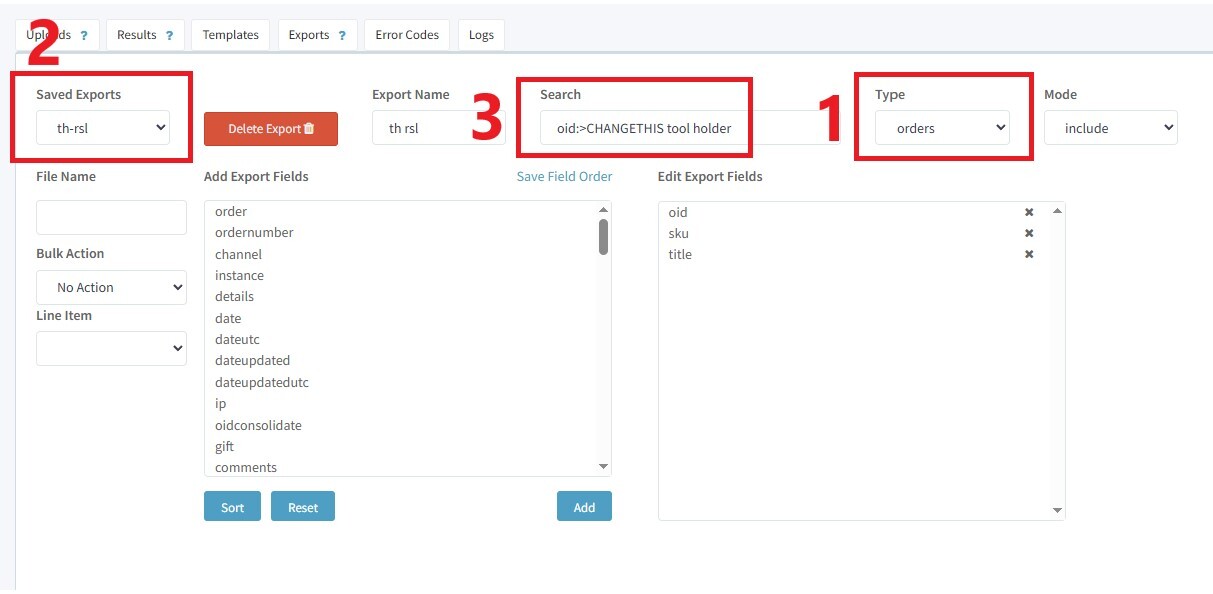
i. Change "Type" to "orders"
ii. Select "th-rsl" from the "Saved Exports" dropdown *Will not appear if Type is still set to "products"
iii. In the "Search" bar, replace "CHANGETHIS" with the last exported OID, which can be found in the top-left corner of the "Listing Totals" tab of the Tool Holder Backup Spreadsheet:
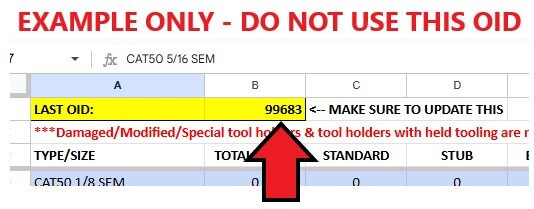
IMPORTANT: There must be no space between "oid:>" and your starting OID, or the export will fail.
iv. Click "Export" on the lower right side of the screen. The page will reload.
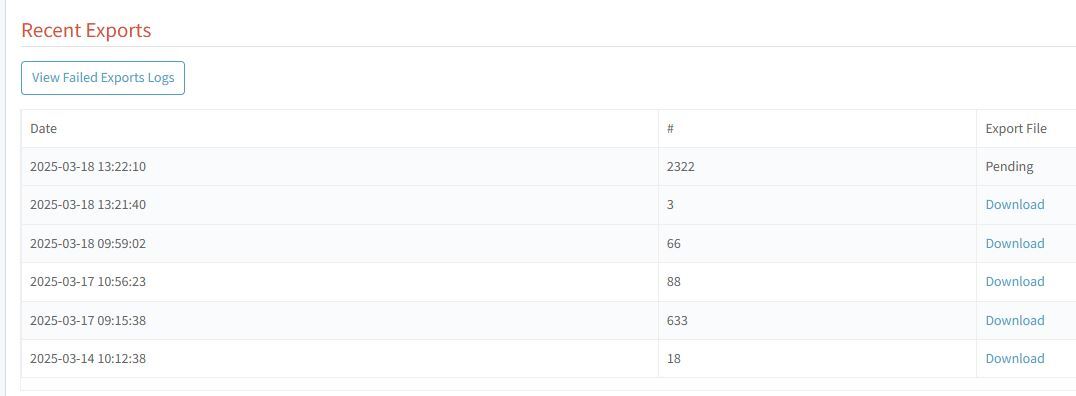
c. Scroll down to the bottom of the page and you will see "Recent Exports". Your export will be at the top of the list. If it says "Pending" (like in the screenshot below), wait 30-60 seconds and then refresh the page, repeating as necessary until it changes from "Pending" to "Download". Then, click "Download" to download the export file.
2. Open the RSL Pick List Template
3. Open the export file and scroll to the bottom. Copy the final OID on the list and paste it over the previous "LAST OID" on the Tool Holder Backup Spreadsheet. *Make sure this always gets done!*
4. Go back to the top of the list, then for each SKU:
a. If it is new, or not a tool holder - skip and move on to the next SKU
b. Confirm that the listing is out of stock by searching the SKU in SureDone and checking the available quantity. If the stock is not 0, skip and move on to the next SKU.
c. Find the size on the "Listing Totals" tab of the Tool Holder Backup Spreadsheet and check the current listed quantity:
Current target number: 10 standard, 5 stub, 5 extended (Note: There are some sizes where stub length should be treated as "standard" - ask your supervisor if you are not sure)
i. If the total is at or below the current target number:
1. If we do not have this size in BUTH, skip this SKU and move on to the next one
2. If we do have this size in BUTH, it will be added to the pick list. The following information will be entered into each column:
a. SKU - The SKU of the out-of-stock listing which is being restocked
b. TYPE / SIZE OR OLD SKU - The type and size of the tool holder, such as CAT50 ER32 or BT40 3/4 SEM. "SEM" can be used as an abbreviation for "Solid End Mill"
c. BUTH / LOCATION - The BUTH location for this tool holder, which can be found on the Tool Holder Backup Spreadsheet.
i. Be sure to check any comments which may tell you whether the location contains certain projections - for example if you are restocking an extended length tool holder, and the location has a comment stating "no extended", then you should not put this location on the sheet as we already know there are no extended tool holders in this location to pull from.
ii. If there are multiple possible locations, enter just the location with the lowest quantity.
iii. Some locations say "C.T." at the end - these locations are for Coolant Thru tool holders only, and should not be selected for any non-coolant thru listing
d. ALTERNATE LOCATIONS - If this size appears in multiple BUTH locations, enter the other locations in this cell. If there are no additional locations, leave this blank. Again, be sure to check any comments and skip any locations that are noted to not have the needed projection.
e. PROJECTION / NOTES - Enter either "STANDARD", "STUB", or "EXTENDED" - whichever is accurate for the listing being restocked
40 Taper: Stub = 2" or less, Extended = Over 4.5"
50 Taper: Stub = 2.5" or less, Extended = Over 5"
If this is a lot: Instead of the projection, enter 5pc LOT
ii. If the total is above the current target number: We will restock using an existing listing with the least sold history:
1. Go to eBay -> My eBay -> Listings
2. Search for the type and size of tool holder you are looking to restock. This should include the taper style & size (CAT50, CAT40, BT50, etc.) as well as the tool holding type and any relevant size (such as the I.D. for a solid end mill holder, the pilot O.D. for a face mill holder, etc.). For best results, enter any sizes as decimals rather than fractions and use 1.0 or 2.0 instead of 1" or 2".
a. Click on "Sold Quantity" to sort the results by their sold history, if they are not already
b. Find a matching listing with the lowest sold quantity that is also in stock. Click on the title to open the listing.
c. Check the available quantity - if it is more than 1, we can still use the listing, but the quantity must be noted on the pick list so that all of the tool holders get picked. If there is a large quantity (like more than 3), it would be better to use a different listing if there is another one available.
d. Enter the following information into each column of the pick list:
i. SKU - The SKU of the out-of-stock listing which is being restocked (NOT the in-stock one you just found in the previous steps)
ii. TYPE / SIZE OR OLD SKU - The SKU of the in-stock listing you found in the previous steps
iii. BUTH / LOCATION - The location of the in-stock listing, which can be found at the bottom of the eBay item description
iv. ALTERNATE LOCATIONS - Leave blank
v. PROJECTION / NOTES - Enter the type and size of the tool holder, such as CAT50 ER32 or BT40 3/4 SEM. "SEM" can be used as an abbreviation for "Solid End Mill"
e. Decrease the listing total by 1 on the backup spreadsheet (within the corresponding projection column, NOT the "Total Listed" column)
5. Once you gone through all SKUs on the export file:
a. Rearrange the pick list so that it is sorted by location: All BUTH picks should go first, then West Bay, Northwest Room, East Bay, Front Room - this will make the pick more efficient
- For BUTH picks: Individual tool holders first, then lots
b. End all SKUs from the "TYPE / SIZE OR OLD SKU" column:
i. Click & drag to select all SKUs in this column, then Copy
ii. In SureDone, type an open parentheses [(], then Paste the SKUs, then type a close parentheses [)], then Search
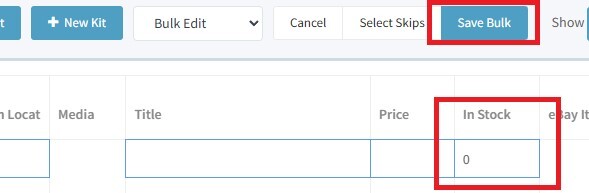
iii. Click the checkbox next to "SKU | GUID" to select all results, then select "Bulk Edit" from the Bulk Actions dropdown menu
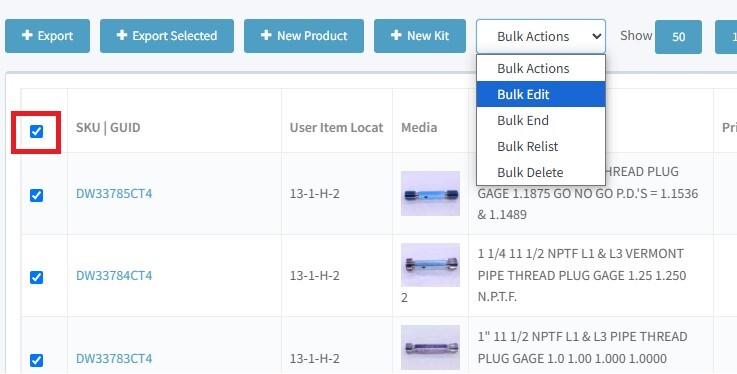
iv. In the new row that appears at the top, enter 0 under "In Stock", then click "Save Bulk". This will set all listings to quantity 0.
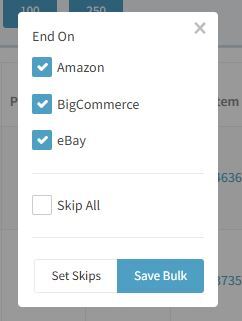
v. With all listings still selected, select "Bulk End" from the Bulk Actions dropdown menu. The popup below will appear. Make sure all three platforms are selected (they should be by default), then click "Save Bulk" to end the listings.
vi. Print the pick list and proceed to picking.
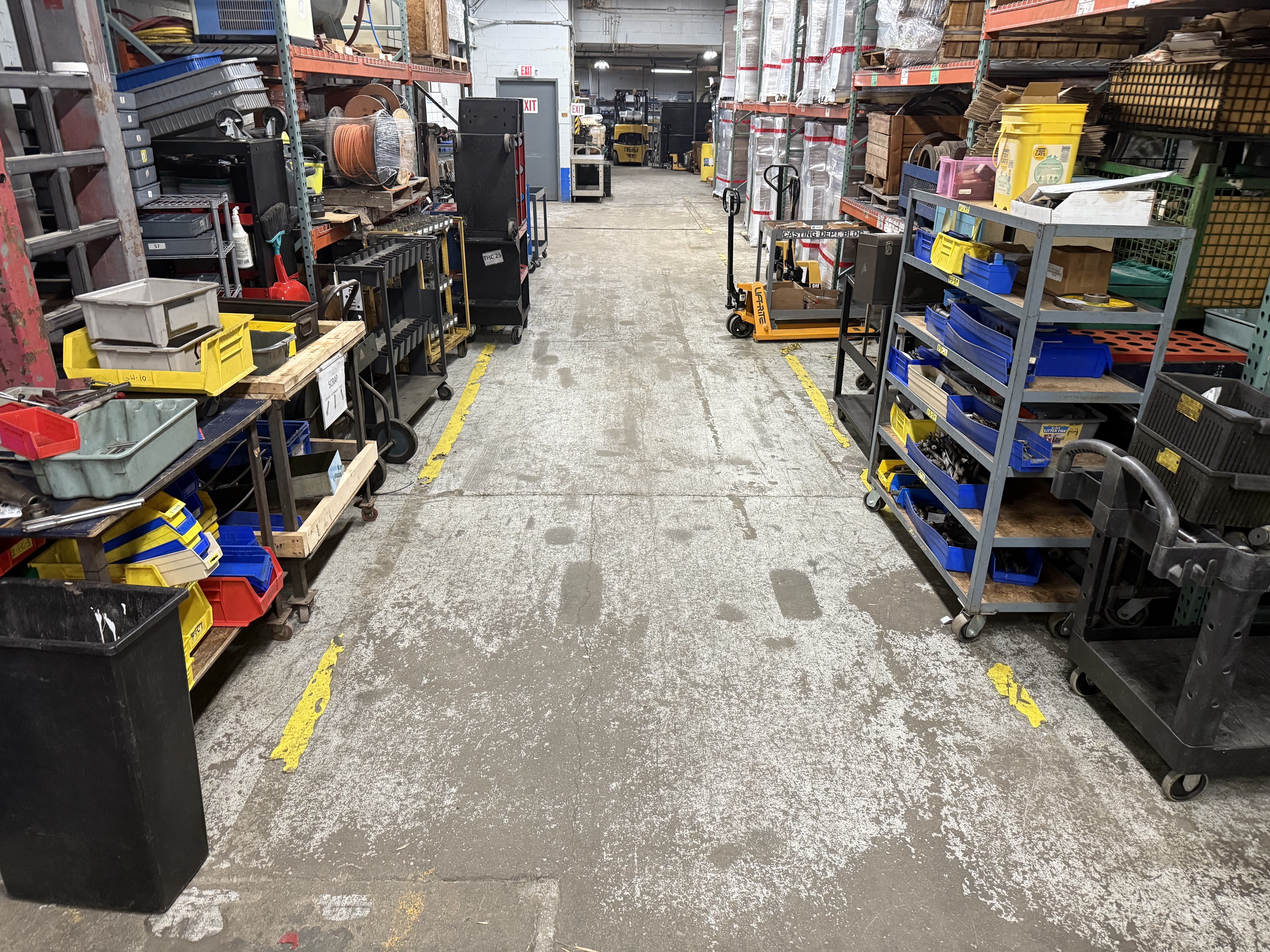
1. Always use the wooden Tool Holder RSL cart, which is kept downstairs across from the elevator as shown in the picture below:
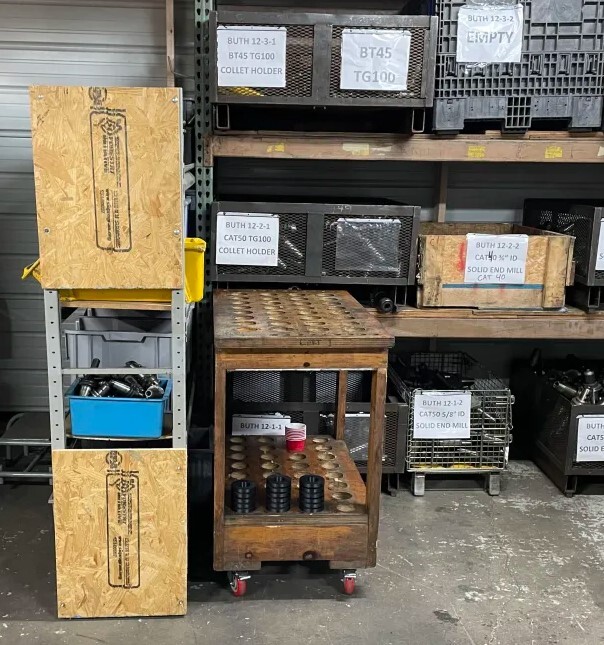
2. Each slot is labeled with a number. Be sure to keep the tool holders in the order of the pick list so that SKUs don't get mixed up.
3. There are black slot inserts (seen in the picture above on the bottom shelf of the cart) which can be used for 40 Taper holders. They should always be put back on the bottom of the cart when not in use.
4. If there are any tool holders (or other tools) already on the bottom of the cart before you begin the pick: These are items that need to be listed. They should be cleaned along with the RSL and brought upstairs to be added to another tray or listed individually (do not include them in the RSL listings)
5. Always try to match the requested projection:
40 Taper: Stub = 2" or less, Extended = Over 4.5", Standard = Anything between 2" and 4.5"
50 Taper: Stub = 2.5" or less, Extended = Over 5", Standard = Anything between 2.5" and 5"
6. Chosen tool holders should include all hardware (set screws, collet nuts, face mill screws, etc.) unless there are no other options. We have some spare hardware on hand if needed - ask your supervisor if you need help finding anything
7. Always inspect for damage, especially to the threads of a collet chuck tool holder. Damaged tool holders should not be used for RSL unless there are no other options, in which case the damage must be clearly pictured and described in the listing.
8. Lots:
a. TG collet chucks should always have matching nuts. Do not combine round and hex nuts in the same lot.
b. Some tool holders have a black oxide coating on the taper - these should not be used for lots unless all 5 pieces are black oxide coated.
c. Lots do not have to be all the same projection, but it is generally preferred to use standard projections unless we have a very large number of stub / extended available for that size
9. If you find identical tool holders (same brand / part #, very similar condition), they can be pulled together and listed as a multiple stock listing. When this happens, write "x2" (or x3, x4, whatever the actual number is) next to that slot on the pick list so that the backup inventory spreadsheet can be updated accurately.
10. If there are no acceptable options that can be pulled for a given tool holder, write "NF" (for Not Found) next to the slot on the pick list and move on to the next slot.
11. For sizes with multiple locations given on the pick list, notate which location you pulled from (by highlighting, circling, underlining, etc.) so that the backup inventory sheet can be updated accurately.
12. BUTH tool holders must be cleaned downstairs before the cart is brought upstairs. Refer to the Cleaning section for more information
13. Once cleaning is complete, bring the cart upstairs on the elevator (your supervisor will train you on how to operate it properly) and continue picking the remaining listed tool holders
All tool holders must have retention knobs removed. Tool holders with retention knobs should not ever be brought upstairs unless explicitly approved by Matt H.
Most retention knobs will be able to be removed by hand using a wrench at the fixture attached to the support beam in the middle of the tool holder breakdown area.
If you are not able to remove a retention knob, it will need to be set aside for heat treatment:
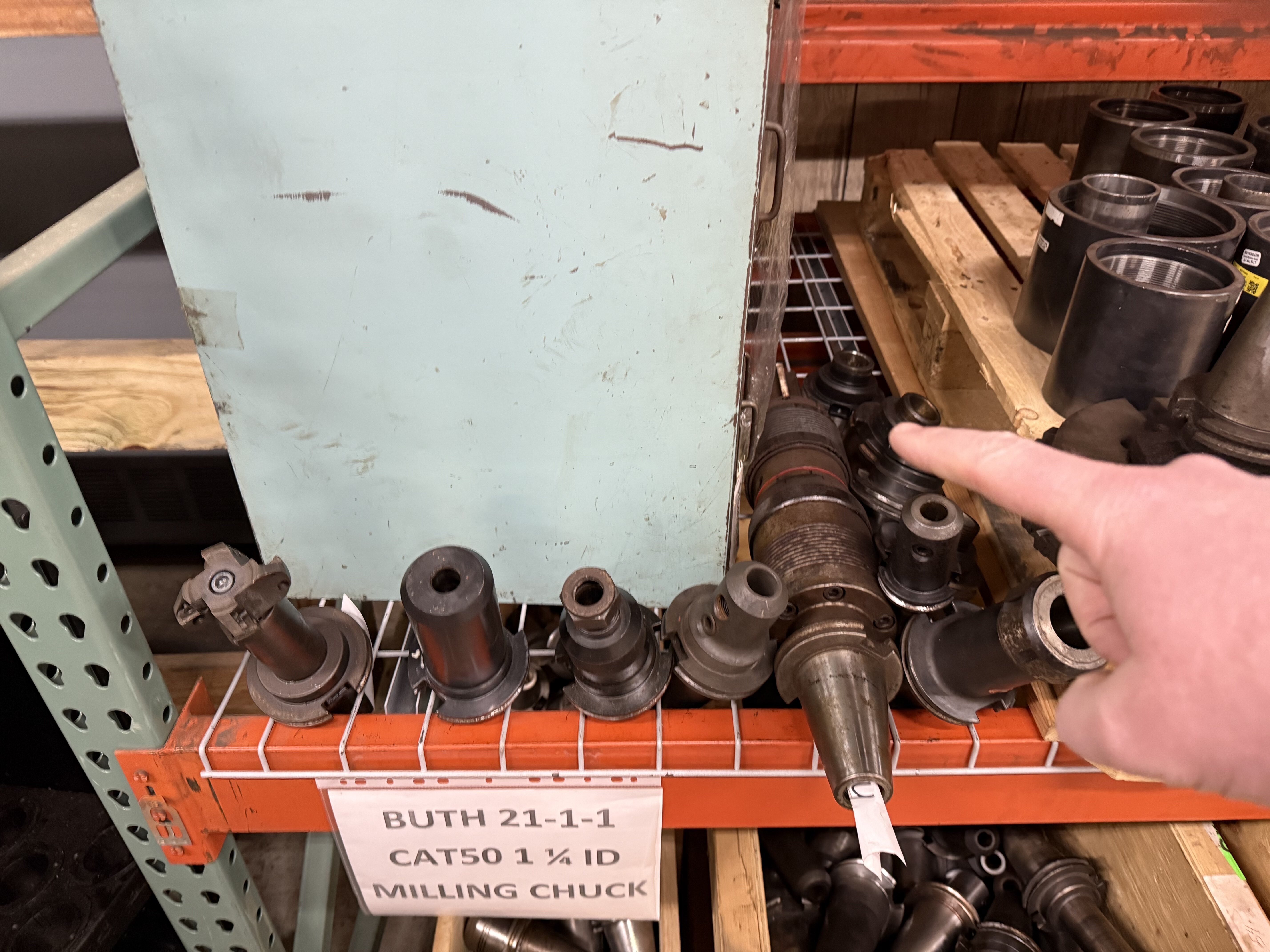
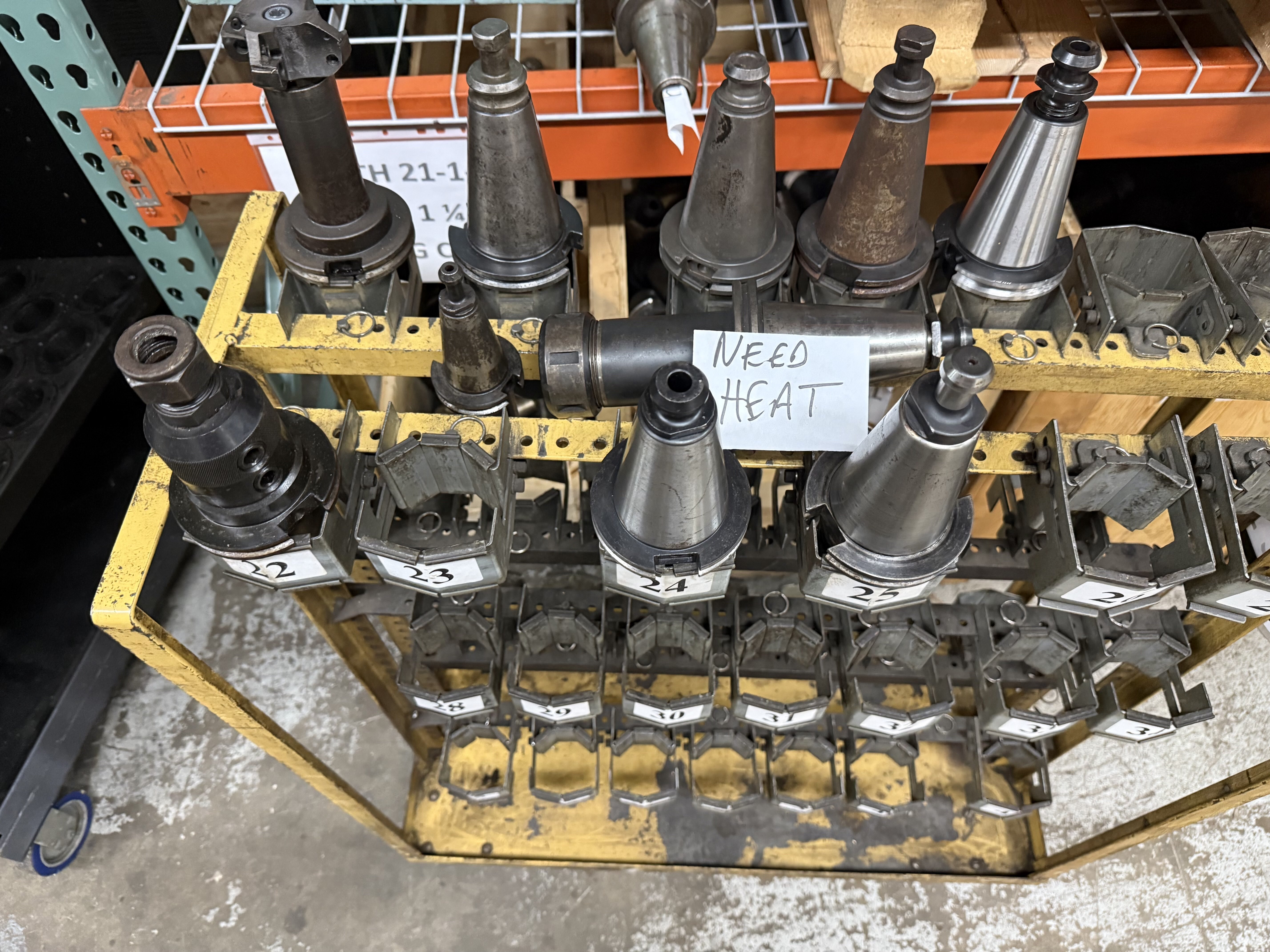
1. Place the tool holder on the shelf directly above BUTH 21-1-1, slotted into the wire rack as shown in the picture below. Large tool holders can instead be placed on their side like the one also shown below:
2. If this area is getting full, grab an empty tool holder cart from this area (to the left as you are facing the rack shown above):
3. Place it in front of BUTH 21-1-1 and place tool holders in it retention knob side up, with a ticket stating "NEED HEAT"
4. Replace any tool holders that could not have their retention knobs removed with additional picks from BUTH.
***All cleaning is to be done downstairs before the cart is brought up on the elevator***
1. Use the wire wheel to remove all rust, paint, etc. from outside surfaces
a. Collet chucks - be sure to remove the nut and clean the threads
b. Be sure to get in between the flange, as there is often rust / grime here
c. Be careful around printed labeling, as this can sometimes be worn off by the wire wheel
2. After using the wheel (or if the wheel is not needed), polish the taper and other outside surfaces using Scotch-Brite
3. All inside surfaces (including set screw holes, the retention knob hole, the inside of collet nuts, etc.) are to be cleaned using the drill at the cleaning station. There are a variety of brush sizes in the drawer which can be used to fit into any area that needs cleaned.
a. Always put the battery back on the charger when finished with the drill, so that it will be ready to use next time
4. Wipe down the tool holder with a dry rag to remove any remaining debris / residue
5. Tool holders should be wiped down one final time immediately before picturing, in order to remove any fingerprints from the surface
Please refer to the Tool Holder FAQ for details.
IMPORTANT: The example pictures currently show blue backgrounds and watermarks, which are no longer used. All tool holders are to be pictured on white backgrounds with no watermark. All other details of the pictures (angles, order, etc.) remain accurate.
The Tool Holder RSL is listed using the Tooling RSL Template, which is nearly identical to the normal Tooling Template. The only major differences are:
1. You will not enter initials / SKU # / auction code / etc.
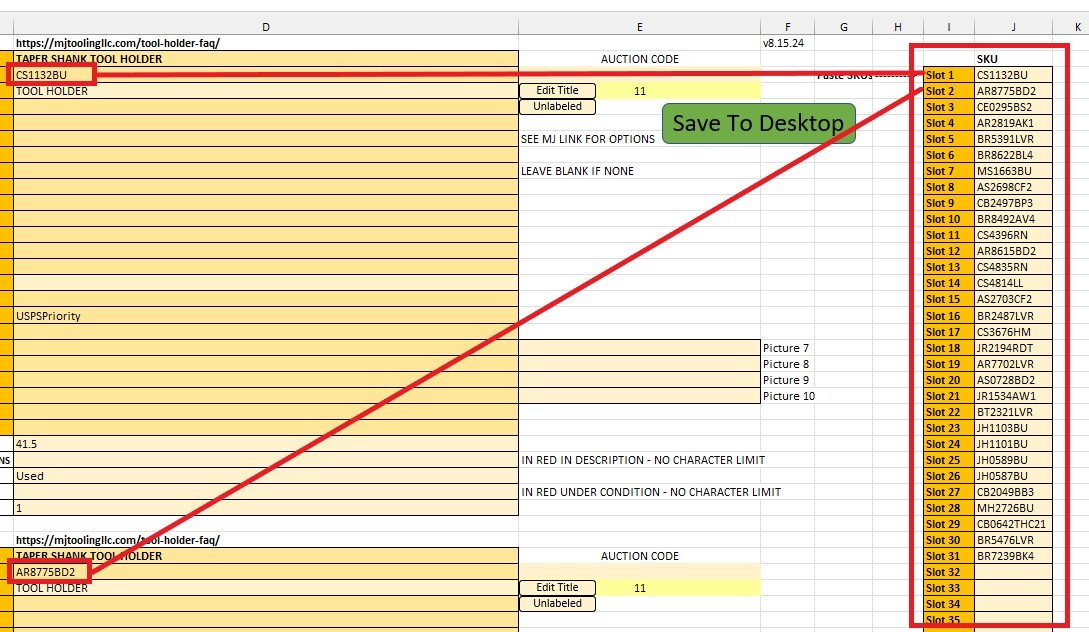
2. To the right of slot 1 (you will have to scroll over), there is a "Paste SKUs" section. Copy and paste all of the SKUs from the "SKU" column on the pick list into these slots. This will automatically transfer each SKU into the corresponding slot on the template as shown in the screenshot below:
3. After this, the listing process is identical to a normal tool holder listing. Refer to the Tool Holder FAQ for more information on this process if needed.
***If any slots were Not Found, make sure to skip them in the template***
Follow the same stocking procedure as you would for any other items, making sure to select appropriately sized locations for each item. Avoid overstocking bins and relocate items if needed. Once stocking is complete, the RSL cart should be placed on the elevator. You do not need to bring it downstairs at this time - the shipping department will take care of this at the next mail pickup.
Finally, the pick list should be brought to the person in charge of logging the RSL (currently Matthew).