
***Read This First***
All messages to customers should begin with
"Good Morning" or "Good Afternoon" and end with:
Regards,
(Your Name) / M & J Tooling LLC
TOOLING QUESTIONS
Customer requests additional measurements / product details
Customer requests additional pictures
Customer found a mistake in our listing
"What inserts does this take?"
"Will this work for my machine / application?"
Customer requests additional measurements / product details
Click here for example questions & answers
1. If the item has a part number, search it in Google to see if you can find a manufacturer's or distributor's web page that tells you the requested information. If yes, skip ahead to step 2. Otherwise:
a. If the requested information is something we will be able to determine ourselves (i.e., measurements that can be taken with calipers or micrometers):
i. Write down the SKU and location
ii. Pull the item and take the requested measurements
iii. Re-stock the item in the location listed on SureDone. Do not assume that the location on the label is correct!
iv. Skip ahead to step 2.
b. If the requested information is not something we are able to determine ourselves (such as: dimensions that we do not have the proper tools to measure, very specific questions about the type or hardness of the material is it made out of, part numbers for related parts/accessories, etc.):
i. Reply to the customer's question, explaining that we are not able to determine the information they're looking for, but let us know if there is anything else we can help them with. If you are able to approximate or estimate the information you may do so but be sure to specify that we are not 100% sure that it is correct. Below are some examples:
"Good Afternoon,
Thank you for reaching out. We don't have the proper tools on hand to measure the diameter that far down the bore - I would estimate that it's about .875" but I'm not 100% sure about that. Please let us know if there is anything else we may be able to help you with though!
Regards,
Matthew / M & J Tooling LLC"
"Good Morning,
Thanks for reaching out! I did some digging but wasn't able to come up with a part number for the clamp. I can tell you that the overall dimensions are about .347" x .252" x .109" if that helps at all. Please let us know if there is anything else we may be able to help you with!
Regards,
Matthew / M & J Tooling LLC"
"Good Afternoon,
Thanks for reaching out. Unfortunately we do not have the proper tools on hand to check for runout, but we do honor a 30-day return policy on defective items so if you do purchase this please do not hesitate to reach out if you encounter any issues.
Let us know if you have any other questions!
Regards,
Matthew / M & J Tooling LLC"
ii. Move the message to the "Questions Done" folder. You are now finished with this question.
2. Update the listing in SureDone with the information:
a. Click here for a general overview of updating listings in SureDone
b. Additional information should always be added to the description, which is in the "General" section at the top of the page. Click the "Text Editor" button at the upper-right corner to change the html to plain text, then add the information to an appropriate section of the description (often "Size/Labeling" or "Condition").
c. If the additional information is particularly relevant it can also be added to the title as long as you are able to keep the title length under 80 characters (the number of characters is listed at the far right end of the "title" line). The title must be updated in the General, Amazon, and BigCommerce sections.
Note: For some older listings, the Amazon and BigCommerce titles will update automatically when you edit the title in "General". Also, Amazon and BigCommerce titles should always have the SKU listed at the end of the title. It's okay if this puts the title over 80 characters.
d. Once all changes have been made, click the blue "Update" button in the bottom-right corner of the page.
3. Reply to the customer's question, providing the requested information and noting that we have updated the listing to include it. Below is an example:
"Good Morning,
The shank diameter is 1". I have updated the listing with this information. Let us know if you have any other questions!
Regards,
Matthew / M & J Tooling LLC"
4. Move the message to the "Questions Done" folder. You are now finished with this question.
Customer requests additional pictures
Click here for example questions & answers
1. Write down the SKU and location
2. Pull the item and take the necessary additional picture(s). Be sure to review your pictures to make sure they clearly show the part(s) of the item that the customer is trying to see. Use a pen to point to specific areas if needed.
3. Re-stock the item in the location listed on SureDone. Do not assume that the location on the label is correct!
4. Add the additional pictures to the listing in SureDone - click here for more info on this process
5. Reply to the customer's question:
a. The message can be as simple as "Please see the attached pictures. Let us know if you have any questions!", but feel free to add more information if appropriate (such as something like "You can see the damage to the insert pocket most clearly in the second picture").
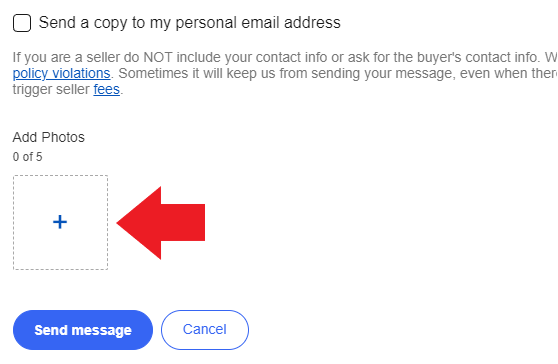
b. Attach the picture(s) either by clicking the box with a '+' sign in it at the bottom of the page, or dragging & dropping the pictures in directly like you did for uploading to SureDone. Make sure all pictures have fully loaded into the message before clicking "send".
c. Move the message to the "Questions Done" folder. You are now finished with this question.
Customer found a mistake in our listing
Click here for example questions & answers
1. Confirm whether or not the listing is in fact incorrect. If you need to pull the item, be sure to re-stock it in the location listed in SureDone. Do not assume that the location on the label is correct!
2. If the customer is correct, and our listing is wrong:
a. Make any necessary corrections in SureDone. Click here for an overview of this process.
b. Reply to the customer's message, thanking them for letting us know about the mistake and letting them know that we have corrected the listing. Below is an example:
"Good Morning,
Thank you for letting us know about this mistake! I double-checked the measurements and you are 100% correct that it is 25mm and not 1". I have updated the listing accordingly. Please let us know if there is anything we can help you with!
Regards,
Matthew / M & J Tooling LLC"
c. Move the message to the "Questions Done" folder. You are now finished with this question.
3. If the customer is wrong, and our listing is correct:
a. Reply to customer's message and politely let them know that we examined the listing and found that it was correct. You may want to include some additional information explaining how we came to that conclusion. Below is an example:
"Good Afternoon,
Thanks for reaching out about this! You are correct that the labeling implies that the I.D. should be 25mm, however when I double-checked the measurements I found that it is indeed 1" as we have it advertised. It's possible that it may have been modified, or it was mislabeled. I've updated the description to explain this.
Please let us know if there is anything else we can help you with!
Regards,
Matthew / M & J Tooling LLC"
b. Move the message to the "Questions Done" folder. You are now finished with this question.
"What Inserts Does This Take?"
Click here for example questions & answers
1. If the item has a labeled part number, search it in Google and try to find a manufacturer's or distributor's web page which lists the inserts held. It will often be a partial callout such as CN43 or SC0903 (because these are the parts of the insert # that actually affect whether or not they fit in the tool). If you are not able to find this information, skip ahead to step 2. If you are able to find this information:
a. Search our store for the matching insert - if we have them, we will include a link in our response so that the customer can potentially purchase the tool and inserts together. Searching for inserts can sometimes be tricky, as partial callouts will typically not bring back results. This means that you will need to search for specific 4-letter part numbers (but leaving out the final number is usually fine - CNMG43 should bring back results for CNMG432, CNMG433, etc.). Several common inserts are listed below:
ADKT
APKT APMT
CCMT CCGT
CNMG CNMA CNMM
CPMT CPMA
DCMT
DNMG
RCMT RCGT
RNMG
RPMT
SNMG SNMA SNMM
SCMT SCGT
SDMT
SEKN
SOMT
SPCT SPMT SPUN SPEB
TCGT TCMT
TNMG TNMA
TPGT TPMR TPMT
VBMT
VCGT
VNGP VNMG
VPET VPGT
WCGT
WNMA WNMG WNMP
WPMT
b. Update the listing to include the insert information. This should always be added to the description, and ideally to the title as well if there is room. If you are editing the title, make sure to do so in the General, Amazon, and BigCommerce sections (in some older listings, Amazon and BigCommerce may update automatically when you edit the title in General).
c. Reply to the customer's message. If we have matching inserts in stock, include a link to the eBay listing(s). Note: When copying an eBay URL, you only need everything up to the first "?" such as in the image below:

Below are some examples:
"Good Morning,
This uses CN43 inserts. I have included some links below to some options that we have in stock. Please let us know if you have any other questions!
https://www.ebay.com/itm/165489841036
https://www.ebay.com/itm/165443689441
Regards,
Matthew / M & J Tooling LLC"
"Good Afternoon,
This uses TC1904 inserts. Please let us know if you have any other questions!
Regards,
Matthew / M & J Tooling LLC"
d. Move the message to the "Questions Done" folder. You are now finished with this question.
2. If you are not able to find the insert information online, we will have to try to figure it out ourselves based on dimensions:
a. Write down the SKU and location
b. Pull the item and bring it to your office to take measurements
c. Insert Identification FAQ / Spade Drill Info
i. If the item currently holds an insert, remove the insert (this usually requires a Torx driver) and take measurements of the insert itself
ii. If the item does not currently hold any inserts, you will have to try to measure the dimensions of the insert pocket as best you can. Once you think you know what the insert is, try to find one in our store that you can use to confirm. Refer to the list of common insert styles in step 1a to help your search.
d. Once you have determined the insert that you believe the item holds, search our store for matching inserts as described in step 1a (if you have not already done so as part of identifying the insert) - if we have them, we will include a link in our response so that the customer can potentially purchase the tool and inserts together.
e. Update the listing to include the insert information in the description. Be sure to specify that this was determined based on the shape and dimensions of the insert / pocket, and may not be 100% correct. Example: "WE ARE NOT 100% SURE WHAT TYPE OF INSERTS THIS HOLDS, BUT BASED ON THE SHAPE AND DIMENSIONS WE BELIEVE IT IS RC33 OR VERY SIMILAR" (Note: You can leave out this disclaimer if you are very confident that you have identified an insert correctly, which will often be the case with spade drill inserts, or 90 degree angle, symmetrical turning inserts such as CN or SN)
f. Reply to the customer's message:
i. Like with the note we added to the description, we want to specify that this information may not be 100% correct
ii. If we have matching inserts in stock, include a link to the eBay listing(s). Note: When copying an eBay URL, you only need everything up to the first "?" such as in the image below:
Below are some examples:
"Good Morning,
I am not 100% sure what inserts this uses, but based on the shape & dimensions of the insert it currently holds I believe it is VC33. I have a link below to one option that we have in stock. Please let us know if you have any other questions!
https://www.ebay.com/itm/135023255109
Regards,
Matthew / M & J Tooling LLC"
"Good Afternoon,
I am not 100% sure what inserts this uses, but based on the shape & dimensions of the insert it currently holds I believe it is WM54. Please let us know if you have any other questions!
Regards,
Matthew / M & J Tooling LLC'
iv. Move the message to the "Questions Done" folder.
Click here for example questions & answers
How to find items in our eBay store:
1. If the customer supplied a part number, try searching this first. If there are no results, you may want to try variations of the part number such as removing dashes or spaces.
2. If there are no results (or no part number was given by the customer), try a more general search for the item that includes things like brand, size, item type, etc. - for example "seco indexable drill 1.5" to look for a Seco indexable drill with a 1 1/2" diameter, or "expansion reamer carbide .7500" to search for a carbide-tipped expansion reamer with a 3/4" diameter.
- Decimals are generally better than fractions for getting the results you're looking for (especially for anything larger than 1"), but some listings may not have decimals included in the title so try the fractional equivalent as well if there are no matching results. "1.0" should be used to search for 1" (and 2.0 for 2", 3.0 for 3", etc.).
- Reamer and plain gage searches are more likely to return the correct results if the size is searched in a four-decimal-place format (for example .5000 for 1/2 instead of just .5).
- Try to limit your search to just terms that you are confident will be in the title, since any search terms that are not present in the title will cause the listing not to come back in the search results. It's good to keep in mind that many item types have words that will usually appear in the title, but are sometimes removed in order to keep the title under 80 characters. The most common occurrences are listed below:
-"Flute" is frequently abbreviated to "FL"
-"Straight Flute": "Straight" is frequently removed
-"Coolant Thru" is often shorted to just "Coolant"
-OALs are frequently removed from titles
-Items with Coatings: "Coated" is frequently removed ("TiN COATED HSS" --> "TiN HSS")
-Taper Shank Tool Holders:
-"Projection" is often abbreviated to "Proj." (or removed entirely)
-"Stub" and "Extended" are sometimes removed
-Inserts:
-"Turning" and "Milling" are typically not included in titles
-Inserts with both American & metric designations might not have both in the title, and formatting for the part number can be inconsistent (ex: CNMG432 vs. CNMG 432 vs. CNMG-432)
-End Mills: Center Cutting / Non-Center Cutting is almost never included in titles
-Twist Drill Bits: "Twist" is frequently removed
-Boring Bars: Material is usually not included in the title unless it is Carbide
-Reamers:
-"Chucking" is frequently removed
-"Carbide Tipped" is sometimes shortened to "Carbide Tip"
-Shank diameters are typically not included in titles (unless it's Morse Taper)
3. If you find a match:
a. Open the listing and copy the URL. Note: When copying an eBay URL, you only need everything up to the first "?" such as in the image below:
b. Reply to the customer's message, providing the eBay link to the requested item(s). If we have multiple options, you can include links to two or three of them (more than that is typically a waste of time, as customers will typically only look at the first one or two). Below are some examples:
"Good Afternoon,
Thank you for reaching out. We do have one of these in stock, which I have linked below. Please let us know if there is anything else we can help you with!
https://www.ebay.com/itm/166849546456
Regards,
Matthew / M & J Tooling LLC"
"Good Morning,
Thank you for reaching out. We have a few different options available, which I have linked below. Please let us know if there is anything else we can help you with!
https://www.ebay.com/itm/166849546456
https://www.ebay.com/itm/135021892766
https://www.ebay.com/itm/135057571799
Regards,
Matthew / M & J Tooling LLC"
c. Move the message to the "Questions Done" folder. You are now finished with this question.
4. If there are no exact matches, try to find something similar to what the customer is looking for that we can offer as a possible alternative. This should be an item that matches the main specifications (such as cutting diameter and material for a reamer or drill bit, or shank diameter and type of inserts held for a boring bar) but could be a different brand, coating, number of flutes, etc.
a. If you find a similar item (or items), open the listing(s) and copy the URL. Note: When copying an eBay URL, you only need everything up to the first "?" such as in the image below:
b. Reply to the customer's message, providing links to the options you found. Be sure to mention that this is not an exact match, but is a similar alternative. Below is an example:
"Good Morning,
We don't have that exact item available, but I found some similar options that you may be interested in, which I have linked below. Let us know if there is anything else we can help you with!
https://www.ebay.com/itm/166849546456
https://www.ebay.com/itm/135021892766
https://www.ebay.com/itm/135057571799
Regards,
Matthew / M & J Tooling LLC"
c. Move the message to the "Questions Done" folder. You are now finished with this question.
5. If you do not find any similar alternatives, reach out to the sales team to see if this is something we are able to get a quote on.
a. If we are able to find a source for the item (or a similar item), the sales team will reply to the customer with a quote. You do not need to do anything else with the message at this point.
b. If we are not able to get a quote, reply to the customer politely letting them know that we are not able to provide this item, but please let us know if there is anything else we can help them with. Below is an example:
"Good Afternoon,
Thank you for reaching out, but this is not something that we are able to offer at this time. We appreciate the opportunity though, and please let us know if there is anything else we can help you with!
Regards,
Matthew / M & J Tooling LLC"
c. Move the message to the "Questions Done" folder. You are now finished with this question.
"Will this work for my machine / application?"
Click here for example questions & answers
***In Most Cases: We Cannot Answer That***
Depending on the specific question you may be able to find a direct answer from the manufacturer. For example, if a customer asks "will these inserts work for cutting [specific material]", you can try searching the brand and insert grade to find a data sheet from the manufacturer that will give you that information. If you find a clear answer directly from the manufacturer, you may pass along this information to the customer. Be sure to specify that this information comes directly from the manufacturer. We do not want this to read as though it is advice from M & J Tooling, as we do not consult on specific jobs / applications. Below is an example:
"Good Morning,
I can't advise on your specific application, but according to Kennametal's website, this insert grade (KC850) is suitable for general purpose use on carbon steels, alloy steels, and tool steels.
Let us know if you have any other questions!
Regards,
Matthew / M & J Tooling LLC"
If you do not find a clear answer directly from the manufacturer, you will have to politely tell the customer that we can't help them. Do NOT offer any advice or subjective information. You may offer to provide additional measurements / details about an item if applicable (such as if a customer is trying to figure out if a tool block will fit a specific model of lathe) so that they can potentially find the answer themselves. Below is an example:
"Good Afternoon,
I don't know enough about that specific machine to be able to say for sure if this will fit, but let me know if there are any additional measurements I could take for you that might help you to answer that question!
Regards,
Matthew / M & J Tooling LLC"
ORDER ISSUES
Item was listed incorrectly (major mistakes) or has undisclosed damage
Item was listed incorrectly (minor mistakes)
Item is out of stock / not found
Multi-piece items: missing / damaged pieces
Customer bought conflicting tool holders (such as CAT and BT together)
Item was listed incorrectly (major mistakes - wrong size, wrong type, etc.) or has undisclosed damage
Click here for example messages
1. Bring up the SKU in SureDone and check if there is multiple stock. If so, it's possible that just this piece is incorrect / damaged and we can simply ship one of the other pieces instead. If this is the case, the incorrect / damaged piece should be brought to the listing manager so that it can be listed separately. Be sure to also reduce the item's quantity by 1.
If there are not multiple pieces, or if there are but they are all incorrect:
2. Search our eBay store for a substitution option:
a. If there is a part number, try searching this first. If there are no results, you may want to try variations of the part number such as removing dashes or spaces.
b. If there are no results (or no part number), try a more general search for the item that includes things like brand, size, item type, etc. - for example "seco indexable drill 1.5" to look for a Seco indexable drill with a 1 1/2" diameter, or "expansion reamer carbide .7500" to search for a carbide-tipped expansion reamer with a 3/4" diameter.
- Decimals are generally better than fractions for getting the results you're looking for (especially for anything larger than 1"), but some listings may not have decimals included in the title so try the fractional equivalent as well if there are no matching results. "1.0" should be used to search for 1" (and 2.0 for 2", 3.0 for 3", etc.).
- Reamer and plain gage searches are more likely to return the correct results if the size is searched in a four-decimal-place format (for example .5000 for 1/2 instead of just .5).
- Try to limit your search to just terms that you are confident will be in the title, since any search terms that are not present in the title will cause the listing not to come back in the search results. It's good to keep in mind that many item types have words that will usually appear in the title, but are sometimes removed in order to keep the title under 80 characters. The most common occurrences are listed below:
-"Flute" is frequently abbreviated to "FL"
-"Straight Flute": "Straight" is frequently removed
-"Coolant Thru" is often shorted to just "Coolant"
-OALs are frequently removed from titles
-Items with Coatings: "Coated" is frequently removed ("TiN COATED HSS" --> "TiN HSS")
-Taper Shank Tool Holders:
-"Projection" is often abbreviated to "Proj." (or removed entirely)
-"Stub" and "Extended" are sometimes removed
-Inserts:
-"Turning" and "Milling" are typically not included in titles
-Inserts with both American & metric designations might not have both in the title, and formatting for the part number can be inconsistent (ex: CNMG432 vs. CNMG 432 vs. CNMG-432)
-End Mills: Center Cutting / Non-Center Cutting is almost never included in titles
-Twist Drill Bits: "Twist" is frequently removed
-Boring Bars: Material is usually not included in the title unless it is Carbide
-Reamers:
-"Chucking" is frequently removed
-"Carbide Tipped" is sometimes shortened to "Carbide Tip"
-Shank diameters are typically not included in titles (unless it's Morse Taper)
3. If you find a substitution option that is completely identical to what was originally listed (same brand, same dimensions, same or better condition, etc.):
a. We do not need to contact the customer regarding the substitution
b. Reduce the sub item's quantity in SureDone
c. Pull the sub item and bring it to the shipping department along with the packing slip and any other items that may have been included on the order
d. Update the original item's listing in SureDone with the corrected information. Click here for an overview of this process.
e. Print a new label (if the item does not currently have one with it) by clicking "Select Action" and then "Inventory Label" at the bottom of the page
f. Re-stock the original item in the location listed in SureDone. If the item already had a label with it, do not assume the location on the label is correct!
4. If you find a substitution option that is functionally identical to what was originally listed (same item type & dimensions but different brand, slightly different condition, etc.):
a. We will send the customer a message explaining the issue with the item they purchased and providing a link to the one we will be substituting so that they can see what they will be getting. We will proceed with shipping the sub item without waiting for the customer to approve the substitution. To contact the customer:
1. Click on "My eBay" in the top-right corner of the page
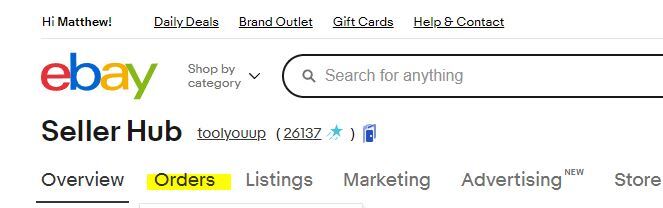
2. Click on "Orders" (underneath "Seller Hub" in the upper-left corner)
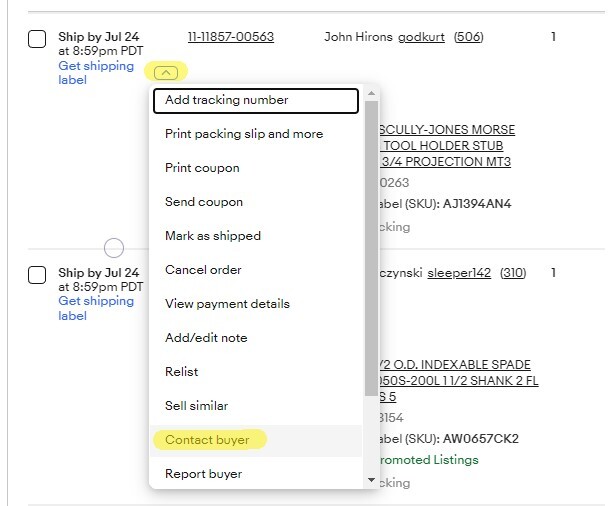
3. Find the order in this list, then click the arrow next to "Get shipping label" and then "Contact buyer"
- On Amazon:
1. Log into Seller Central (you may be prompted to enter an authentication code that you will have to get from Chandler)
2. Click on "Ship Your Orders" in the "Actions" box near the top of the page
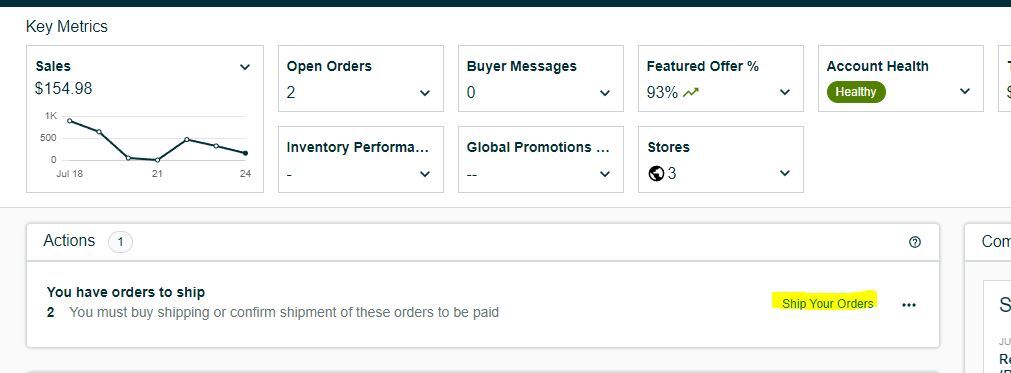
3. Find the order in this list and click on the buyer name
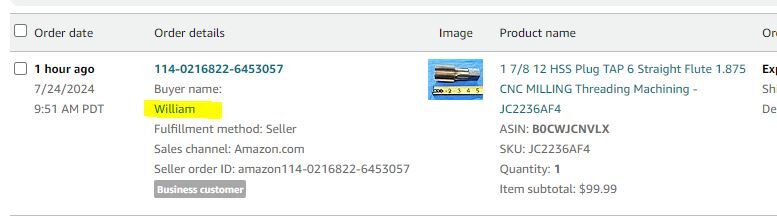
4. When prompted to select a reason for contacting the customer, choose "Confirm order details"
- On our Website (BigCommerce):
1. Log into BigCommerce (you may be prompted to enter an authentication code that you will have to get from the sales team)
2. Click on "Orders" at the top of the sidebar on the left side of the page
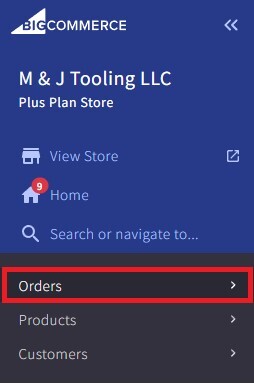
3. Find the order and click on the three dots in the "Action" column at the far right end of the line, then click "Send Message"
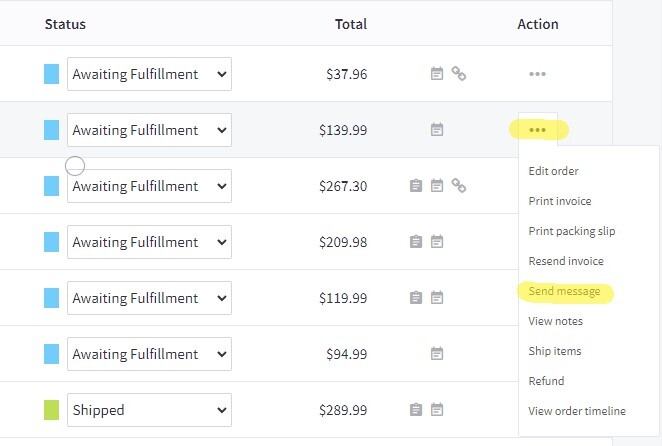
b. The message:
i. Begin the body of the message by thanking the customer for their order
ii. Let them know that we inspect all items before shipping, and give a brief explanation of the issue we found
iii. Provide a link to the item we will be substituting, give a brief explanation of how it differs from the one they originally bought, and assure them that it is functionally identical and is the correct size / type / whatever the issue with the original one was
IMPORTANT: eBay messages can only contain eBay links. Amazon messages can only contain Amazon links. BigCommerce messages can include any links, but should always link to our website rather than eBay or Amazon. Search the item's SKU in SureDone in order to quickly find links to all three stores.
iv. End the body of the message with "Please let us know if you have any questions or concerns, and we appreciate your business"
v. If the original item had undisclosed damage, attach pictures showing the damage
Example:
"Good Afternoon,
Thank you for your order. We inspect all items before shipping, and found that while this reamer is labeled as 8.0mm, it is actually measuring a little oversize at about 8.025mm. We will be substituting this reamer, which is a different brand but measures properly at 8.0mm and should be otherwise functionally identical:
https://www.ebay.com/itm/134959204134
Please let us know if you have any questions or concerns, and we appreciate your business!
Regards,
Matthew / M & J Tooling LLC"
c. Reduce the sub item's quantity in SureDone
d. Pull the sub item and bring it to the shipping department along with the packing slip and any other items that may have been included on the order
e. Update the original item's listing in SureDone with the corrected information. Click here for an overview of this process.
f. Print a new label (if the item does not currently have one with it) by clicking "Select Action" and then "Inventory Label" at the bottom of the page
g. Re-stock the original item in the location listed in SureDone. If the item already had a label with it, do not assume the location on the label is correct!
5. If you find a substitution option that is similar but not functionally identical to what was originally listed (slightly different size, different shank style, different material, etc.):
a. Follow the same process as outlined in step 4, but do not ship the substitution item until we get approval from the customer. The message to the customer is adjusted accordingly, as shown in the example below:
"Good Afternoon,
Thank you for your order. We inspect all items before shipping, and found that this reamer measures .5710", not .5700" as advertised. If that will not work for you, the next closest option I have which I can offer as a substitute is this one, which measures .5705":
https://www.ebay.com/itm/16794583265
If this will work for you please let us know at your earliest convenience and we will get it shipped out right away. Otherwise we can cancel and fully refund the order.
Let us know if you have any questions!
Regards,
Matthew / M & J Tooling LLC"
b. If the customer does not respond to the message within an hour or two, we will follow up with a phone call. If it is later in the day (especially after 3PM) you will want to call immediately after sending the message. The customer's phone number can be found in ShipStation or in the order details in eBay / Amazon Seller Central / BigCommerce.
i. For Amazon customers the number will include an extension that you will need to input. You will also need to input the zip code for the shipping address for the order.
ii. BigCommerce orders sometimes do not have phone numbers supplied. If this is the case, try searching the shipping address in Google to see if it is a business that you can find a phone number for. If not, you should be able to find a direct email address for the customer in the order details in BigCommerce which will be our only other option for contacting the customer. Fortunately website orders are not as time-sensitive since we are not penalized for late shipments like we are for eBay and Amazon orders.
iii. If the customer does not answer, leave a voicemail briefly explaining who you are and why you are calling and leave our number for them to call back (ex.: "My name is Matthew from M & J Tooling and I'm calling about a boring bar that you bought from us on eBay. Please give us a call back at 937-951-3527 at your earliest convenience.")
1. Next, search the shipping address in Google to see if it is a business that you can find a phone number for. If so, call this number and try to get ahold of the customer. You will likely reach a receptionist who can help transfer you if you give them the name on the order. If there is no business number, we will just have to try calling the phone number on the order again later.
2. If we are not able to get ahold of the customer by the end of the day, contact your supervisor for a decision to be made about the order.
iv. If you get ahold of someone:
1. Begin by explaining who you are and why you're calling, and confirm that you are speaking to the right person (ex. "Hi, this is Matthew from M & J Tooling calling about a thread gage that was bought from us on Amazon. Are you the right person to talk to about that?"). If they don't know anything about it, give them the name on the order and they can hopefully transfer you or give you a different phone number to call.
2. Once you've confirmed that you're talking to the customer (or someone who knows about the item in question), explain the issue with the item (ex. "This reamer was advertised as 1/2" but when we checked it before shipping we found it's actually .5005"). If we have a substitution option let them know along with directing them to the message we sent with a link so they can see pictures (ex. "I have another one that's 1/2" but it's not carbide tipped, would that work for you? I sent you an eBay message with a link to it if you want to see pictures").
3. If the customer says that the sub option (or the original item) will work, let them know that we'll get it shipped out right away and thank them for their business. If we are shipping the original item, you can just bring it out to the shipping department along with the packing slip and any other items that are on the order.
If we are shipping the sub option:
a. Reduce the sub item's quantity in SureDone
b. Pull the sub item and bring it to the shipping department along with the packing slip and any other items that may have been included on the order
c. Update the original item's listing in SureDone with the corrected information. Click here for an overview of this process.
d. Print a new label (if the item does not currently have one with it) by clicking "Select Action" and then "Inventory Label" at the bottom of the page
e. Re-stock the original item in the location listed in SureDone. If the item already had a label with it, do not assume the location on the label is correct!
4. If the customer asks to cancel the order, let them know that we'll cancel and refund it right away. Thank them for taking the call and ask them to let us know if there's anything we might be able to help them with in the future.
a. Contact the sales team to process the cancellation & refund
b. Update the item's listing in SureDone with the corrected information. Click here for an overview of this process.
c. Print a new label (if the item does not currently have one with it) by clicking "Select Action" and then "Inventory Label" at the bottom of the page
d. Re-stock the original item in the location listed in SureDone. If the item already had a label with it, do not assume the location on the label is correct!
6. If we have no substitution options:
a. This is basically the same procedure as outlined in step 5, but in this case we are simply asking if they are still able to use the item they purchased, or if they would like to cancel the order. If we are reaching out because the item is damaged, make sure to attach pictures so they can see the damage. An example message is below:
"Good Afternoon,
Thank you for your order. We inspect all items before shipping, and found that there is a chip in one of this drill bit's cutting edges which was not visible in the listing's pictures. I have attached some additional photos for your reference. I don't have any other drills of this size that I could offer as a substitute, but I wanted to see if you might still be able to use this? If not, we can cancel and fully refund this order for you. Please let us know at your earliest convenience, and do not hesitate to reach out if you have any questions!
Regards,
Matthew / M & J Tooling LLC"
b. Like in step 5, we will want to follow up with a phone call if we do not get a response in a timely manner (or if it is late in the day).
c. The customer might ask if they can get a discount since the item wasn't what they were expecting, or we might offer one if they seem to be on the fence about cancelling the order. The exact amount of the discount should be delegated to your supervisor (if you are on the phone with the customer do not be afraid to say "I'll have to check with my supervisor, let me put you on hold for a moment")
d. If we are not able to get ahold of the customer by the end of the day, contact your supervisor for a decision to be made about the order.
Item was listed incorrectly (minor mistakes - wrong brand, less impactful measurements are slightly off, etc.)
Click here for example messages
1. Bring up the SKU in SureDone and check if there is multiple stock. If so, it's possible that just this piece is incorrect / damaged and we can simply ship one of the other pieces instead. If this is the case, the incorrect / damaged piece should be brought to the listing manager so that it can be listed separately. Be sure to also reduce the item's quantity by 1.
If there are not multiple pieces, or if there are but they are all incorrect (in which case you will also need to update the listing with corrected information as outlined here):
2. Search our store (using the steps described here) to see if we have another item which does fully match the listing. If we do, we will substitute this item and the customer does not need to be notified. In these cases:
a. Reduce the sub item's quantity in SureDone
b. Pull the sub item and bring it to the shipping department along with the packing slip and any other items that may have been included on the order
c. Update the original item's listing in SureDone with the corrected information. Click here for an overview of this process.
d. Print a new label (if the item does not currently have one with it) by clicking "Select Action" and then "Inventory Label" at the bottom of the page
e. Re-stock the original item in the location listed in SureDone. If the item already had a label with it, do not assume the location on the label is correct!
3. If we don't have an identical item we can substitute:
a. Send the customer a message detailing the discrepancies. You can include pictures if needed. Let them know that we will proceed with shipping the item, but to let us know if they have any questions or concerns. Click here for more info on how to contact the customer via eBay, Amazon, or our website. Below is an example message:
"Good Morning,
Thank you for your order. We inspect all items before shipping and noticed that there was a typo in this listing. These inserts were listed as having the grade IC9250, but they are actually IC9150.
According to the info I got from Iscar these two grades are basically identical as far as what applications they can be used for so we will proceed with shipping, but I just wanted to reach out and let you know about the discrepancy. If you have any questions / concerns please do not hesitate to reach out!
Regards,
Matthew / M & J Tooling LLC"
b. Hold the order until 3PM in case the customer replies. If we have not heard anything by 3:00 (or if it is already after 3PM when you reach out), bring the order to the shipping department to proceed with shipping.
c. If the customer does reply saying that the item won't work for them:
a. Reply to the message letting them know that we will cancel and fully refund the order
b. Contact the sales team to process the cancellation & refund
c. Update the item's listing in SureDone with the corrected information. Click here for an overview of this process.
d. Print a new label (if the item does not currently have one with it) by clicking "Select Action" and then "Inventory Label" at the bottom of the page
e. Re-stock the item in the location listed in SureDone. If the item already had a label with it, do not assume the location on the label is correct!
Item is out of stock / not found
Click here for example messages
This will follow the same procedure described in the "Major Mistakes / Undisclosed Damage" section. The only notable differences are:
1. Instead of describing an issue with the item, you will be letting the customer know that there was a stocking error and it is no longer available. Below is an example:
"Good Afternoon,
Thank you for your order. It looks like there was a stocking error which caused eBay to show this item as still being available, when it is actually sold out. We would like to substitute this gage for you:
https://www.ebay.com/itm/134736203230
It will look a little different from the one pictured in the listing you had purchased, but functionally it should be identical. Please let us know if you have any questions and we appreciate your business!
Regards,
Matthew / M & J Tooling LLC"
2. If we do not have any possible substitution options, we will simply be notifying the customer that the item is out of stock and that we will be cancelling and fully refunding the order. After messaging the customer, contact the sales team to process the cancellation & refund. Below is an example message:
"Good Afternoon,
Thank you for your order. It looks like there was a stocking error which caused Amazon to show this item as still being available, when it is actually sold out. We do not have any others available that I could substitute, so we will be cancelling and fully refunding this order. Please let us know if there is anything else we may be able to help you with.
Regards,
Matthew / M & J Tooling LLC"
Multi-piece items: missing / damaged pieces
Click here for example messages
If we do not have any others that we can substitute for the missing / damaged pieces, we will send the customer a partial refund and proceed with shipping. In the case of damage, we will still ship the damaged pieces just in case the customer can still get some use out of them. The sales team should be contacted to process the refund, and they will also send the customer a message notifying them. If there is damage, make sure to take pictures that the salesperson can attach to the message.
Customer bought conflicting tool holders (such as CAT and BT together)
Click here for example messages
It's uncommon (but not unheard of) for someone to be running two different tapers, so this is often a mistake on the customer's end. We will want to reach out to confirm before we proceed with shipping, so that we can make any necessary substitutions if needed.
1. Search our store (and also check the tool holder backup inventory) to see if we will have a substitution option. If they bought the same number of each taper (such as 1 CAT50 and 1 CAT40), you should check for opposite substitutions for both, since we don't necessarily know which one they actually needed. If they bought 3 or more tool holders it will usually be more obvious which one is the potential mistake (for example if they bought 4 CAT50's and 1 BT50, the BT50 is probably a mistake).
a. If we have sub options:
i. Contact the customer via the methods outlined here. We will send a message explaining that we noticed the conflicting items on the order and offer to make a substitution if needed. You do not need to link the customer to the substitution option unless there is something special about it that we need to point out. Below is an example:
"Good Morning,
Thank you for your order. We noticed that you purchased two CAT50 tool holders and one CAT40, and I just wanted to reach out to make sure that was what you needed since we don't run into a lot of people who are using both sizes. If you actually needed all three to be CAT50, we can sub one in for the CAT40 for no additional cost. Let us know at your earliest convenience and we'll get this taken care of for you!
Regards,
Matthew / M & J Tooling LLC"
ii. If the customer does not respond to the message within an hour or two, we will follow up with a phone call. If it is later in the day (especially after 3PM) you will want to call immediately after sending the message. The customer's phone number can be found in ShipStation or in the order details in eBay / Amazon Seller Central / BigCommerce.
1. For Amazon customers the number will include an extension that you will need to input. You will also need to input the zip code for the shipping address for the order.
2. BigCommerce orders sometimes do not have phone numbers supplied. If this is the case, try searching the shipping address in Google to see if it is a business that you can find a phone number for. If not, you should be able to find a direct email address for the customer in the order details in BigCommerce which will be our only other option for contacting the customer. Fortunately website orders are not as time-sensitive since we are not penalized for late shipments like we are for eBay and Amazon orders.
3. If the customer does not answer, leave a voicemail briefly explaining who you are and why you are calling and leave our number for them to call back (ex.: "My name is Matthew from M & J Tooling and I'm calling about a boring bar that you bought from us on eBay. Please give us a call back at 937-951-3527 at your earliest convenience.")
iii. Next, search the shipping address in Google to see if it is a business that you can find a phone number for. If so, call this number and try to get ahold of the customer. You will likely reach a receptionist who can help transfer you if you give them the name on the order. If there is no business number, we will just have to try calling the phone number on the order again later.
iv. If the customer responds and:
1. It was not a mistake
a. Thank them for getting back to us and let them know that we will ship the order right away
b. Bring the item(s) and packing slip to the shipping department to be shipped
2. It was a mistake
a. Let them know that we will get the item subbed out and shipped right away
b. Reduce the sub item's quantity in SureDone
c. Pull the sub item and bring it to the shipping department along with the packing slip and any other items that may have been included on the order
d. Increase the original item's quantity in SureDone
e. Print a new label (if the item does not currently have one with it)
f. Re-stock the original item in the location listed in SureDone. If the item already had a label with it, do not assume the location on the label is correct!
v. If we are not able to get ahold of the customer by the end of the day, contact your supervisor for a decision to be made about the order.
b. If we do not have sub options:
i. We will reach out to the customer as described in step a, but in this case we are simply letting them know about the discrepancy and that we can remove the conflicting item from the order if it was in fact a mistake. Below is an example message:
"Good Afternoon,
Thank you for your order. We noticed that you purchased five CAT50 tool holders and one BT50, and I just wanted to reach out to make sure that was what you needed since we don't run into a lot of people who are using both CAT and BT. If you actually needed all six to be CAT50, we unfortunately do not have any other CAT50's in this size that I could substitute, but we can cancel the BT50 from the order and proceed with shipping the five CAT50's. Please let us know at your earliest convenience and do not hesitate to reach out if you have any questions!
Regards,
Matthew / M & J Tooling LLC"
ii. Like in step a, we will want to follow up with a phone call if we do not hear back within a couple hours (or if it is after 3PM)
iii. If the customer responds saying that it was indeed a mistake and asks to remove the item from the order:
1. Contact the sales team to process the cancellation & refund
2. Increase the item's stock in SureDone
3. Print a new label (if the item does not currently have one with it)
4. Re-stock the item in the location listed in SureDone. If the item already had a label with it, do not assume the location on the label is correct!
iv. If we are not able to get ahold of the customer by the end of the day, contact your supervisor for a decision to be made about the order.